

If you want to know how to set password in Windows 11 PC, read this post. In Windows 11, there are several input options in the operating system. For example, fingerprint, facial recognition and the most popular, personal password.
Knowing how to enter Windows 11 with password is a very important security option for users. Mainly, for those who do not wish to use another form of authentication. But first, you need to know how to set a password in Windows 11.
In this post, we will guide you through the necessary steps to know how to set a password in Windows 11. So, follow the steps below and say if you were able to set a password in Windows 11.
How to create password in Windows 11
To set the Windows 11 sign-in password, follow the steps below:
- Open Settings.
- Select Accounts.
- Click Sign-in Options.
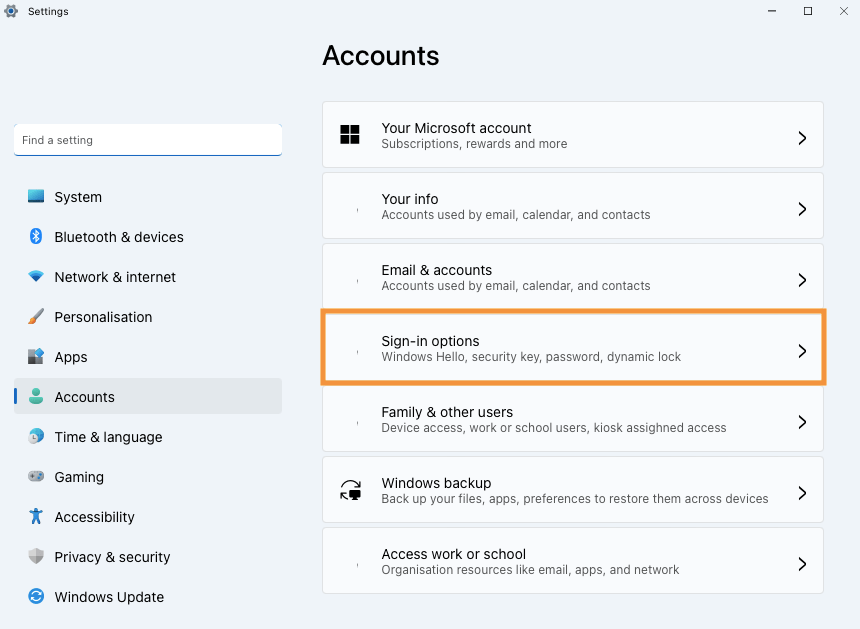
- Find the Password option.
- Click Add.

- Enter the new password.
- Confirm the new password.
- Set a hint in case you forget the password.

- Click Next.
- Click Finish.
After following the steps above, Windows 11 will require the new password to log into the user account.
Summary
Learn how to add password to your Windows 11 user account.
So, follow the steps above and tell us in the comments if you managed to put a password on your computer in Windows 11 correctly.